Core Web Vitals work gets treated as a plugin decision. It is not. A caching plugin helps with server response, but the three metrics Google actually measures are mostly decided by how your pages are built.
Here is what each one measures and the fix that moves it most.
LCP — Largest Contentful Paint
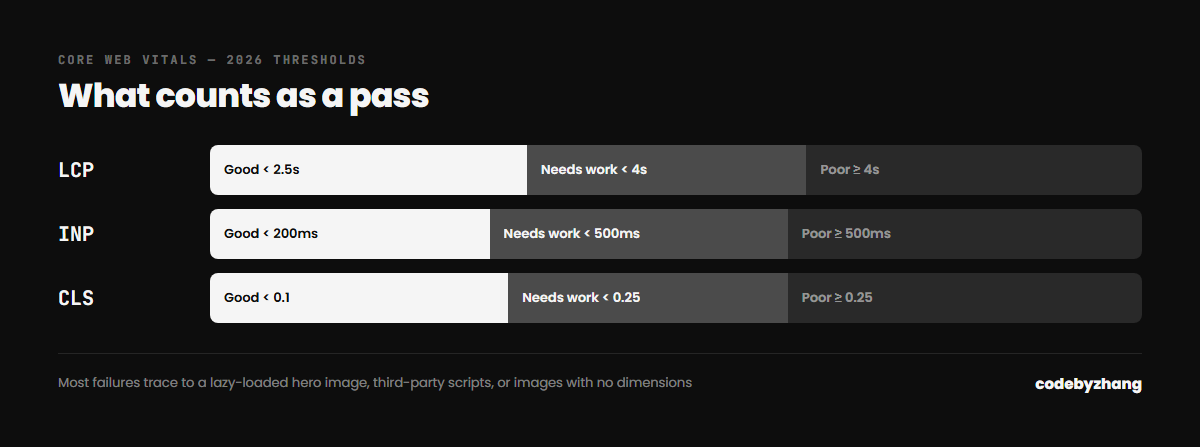
What it measures: how long until the biggest visible element — usually your hero image or headline — finishes rendering. Target: under 2.5 seconds.
The fixes that matter, in order:
- Do not lazy-load the LCP image. This is the single most common self-inflicted wound. Lazy-loading is right for everything below the fold and actively harmful for the hero. Set
loading="eager"on it and let everything else default to lazy. - Preload it. A
<link rel="preload">for the hero image starts the download before the CSS finishes parsing. - Serve it at the right size. A 3000px-wide JPEG scaled down in CSS still downloads at full weight. Use responsive
srcsetand modern formats — WebP or AVIF. - Fix server response time. If time to first byte is over 600ms, no front-end work will save you. This is where caching genuinely earns its place.
INP — Interaction to Next Paint
What it measures: how quickly the page responds when someone taps or clicks. It replaced First Input Delay and is considerably harder to pass, because it samples every interaction rather than just the first. Target: under 200ms.
The fixes:
- Cut JavaScript you do not use. The average WordPress site loads several plugins’ scripts on every page, including pages that never use them. Dequeue per-template.
- Break up long tasks. Any single JavaScript task over 50ms blocks the main thread. Sliders, analytics wrappers and chat widgets are common offenders.
- Defer third-party embeds. Chat widgets, heat-map scripts and social embeds are usually the biggest INP contributors on an otherwise clean site. Load them on interaction, not on page load.
- Avoid heavy work in scroll handlers. Use IntersectionObserver rather than measuring positions on every scroll event.
CLS — Cumulative Layout Shift
What it measures: how much the page jumps around while loading. Target: under 0.1.
The fixes:
- Set width and height on every image. Without dimensions the browser cannot reserve space, so everything below shifts when the image lands.
- Reserve space for ads, embeds and banners. Anything injected after load needs a container with a fixed minimum height.
- Handle web fonts deliberately. Use
font-display: swapwith a fallback whose metrics are close to the real font, or you trade an invisible-text delay for a visible reflow. - Never insert content above existing content. Cookie bars and notification strips that push the page down are a guaranteed CLS failure.
Measuring it properly
Lighthouse in Chrome DevTools gives you lab data — a simulated load on a simulated device. Search Console gives you field data from real visitors, which is what actually counts for ranking. They routinely disagree, and when they do, field data wins.
Check the field data first, find which URL group is failing, then use lab tools to diagnose that specific page. Optimising against a Lighthouse score alone is how sites end up with a 98 in the lab and a failing grade in the real world.
What not to bother with
Chasing a perfect 100 is a poor use of budget. The thresholds are pass/fail bands, not a leaderboard — a 92 and a 100 rank identically. Get into the green, then spend the remaining time on content and conversion.
Performance is part of every build I ship, and it is one of the things I check first in a site audit. If your Vitals are failing and you want to know why, send me the URL.