Most horror stories about migrations losing traffic are really stories about missing redirects. The platform change is rarely the problem. The URL change is.
Here is the sequence I use, in order, having run this migration for a regional brand with an established search presence.
Before you touch anything: inventory
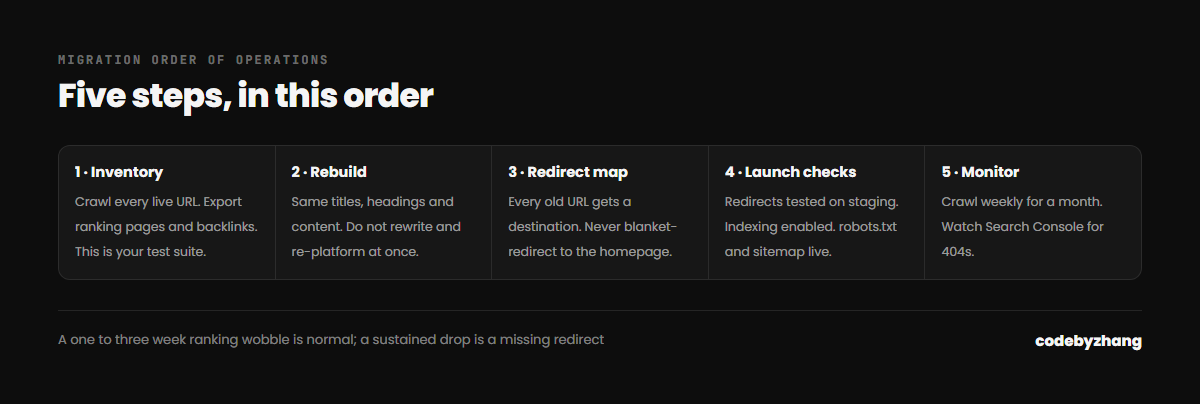
You cannot redirect what you have not listed. Export three things first:
- Every live URL. Crawl the existing site and export the full list. Do not trust the sitemap alone — it routinely misses pages.
- Your ranking pages. Pull the last 12 months from Search Console, sorted by clicks and impressions. These are the URLs that must not break.
- Your backlinks. Any page with external links pointing at it is worth preserving even if its traffic looks small.
This inventory is your test suite. Everything else in the migration is checked against it.
Rebuild with the same content model
Resist the urge to rewrite everything at once. A platform migration and a content rewrite are two separate projects, and combining them makes it impossible to diagnose a ranking drop — you will never know whether it was the URLs or the new copy.
Keep page titles, headings and body content substantially the same for launch. Improve them a month later, once the migration is proven stable.
Build the redirect map
For every old URL, decide its new destination:
- Same page exists? 301 to the new URL.
- Page merged into another? 301 to the merged page.
- Page genuinely gone with no equivalent? Let it 410, or redirect to the closest relevant parent — never blanket-redirect everything to the homepage, which search engines treat as a soft 404.
Wix uses some unusual URL patterns, including hash fragments on older sites and a /post/ prefix on blog articles. Check how your specific site is structured before assuming a simple rule will cover it.
Preserve the technical signals
- Titles and meta descriptions — carry them across rather than regenerating.
- Structured data — rebuild any Article, Product, LocalBusiness or FAQ markup you had.
- Images — keep the alt text, and do not drop resolution. Image search traffic is real traffic.
- Canonical tags — point to the new URLs, and make sure only one version of the domain resolves.
Launch day checklist
- Redirects live and tested before DNS changes, on the staging domain.
- Search engines no longer discouraged — in WordPress, confirm Settings → Reading has indexing enabled. This single checkbox has silently killed more launches than any other setting.
robots.txtserving real rules, with a working sitemap URL.- Sitemap submitted in Search Console.
- Analytics and Search Console verified on the new site.
The first month
Expect a wobble. Rankings commonly move for one to three weeks while search engines recrawl and consolidate signals. What you are watching for is not day-to-day noise but a sustained decline in a specific set of pages — that is a redirect problem, and it is fixable.
Crawl the site weekly for the first month and check for 404s in Search Console. Most post-migration losses are recovered by finding the four URLs nobody mapped.
I have run this migration end to end, including the redirect mapping and structured data rebuild. If you are planning one, send me the site and I will tell you what it involves.